
Generative AI
The harness is a product


It started with a simple bug fix. Our AI coding agent inspected the code, traced the flow, made a change and ran the tests. Everything was going smoothly.
Then the task grew. More files, tool outputs, test failures, logs and previous attempts started piling up. The agent began revisiting failed approaches, overlooking earlier constraints and spending time on information that no longer mattered.
The information was still there. The agent just wasn't using it effectively. This decline in an agent's ability to make use of its working context is known as context rot.
For developers and AI practitioners building agents or using AI coding tools, this guide explains why context rot happens, how to recognize it and how to manage context more deliberately. It also looks at the role an agent harness can play in keeping an agent on track.
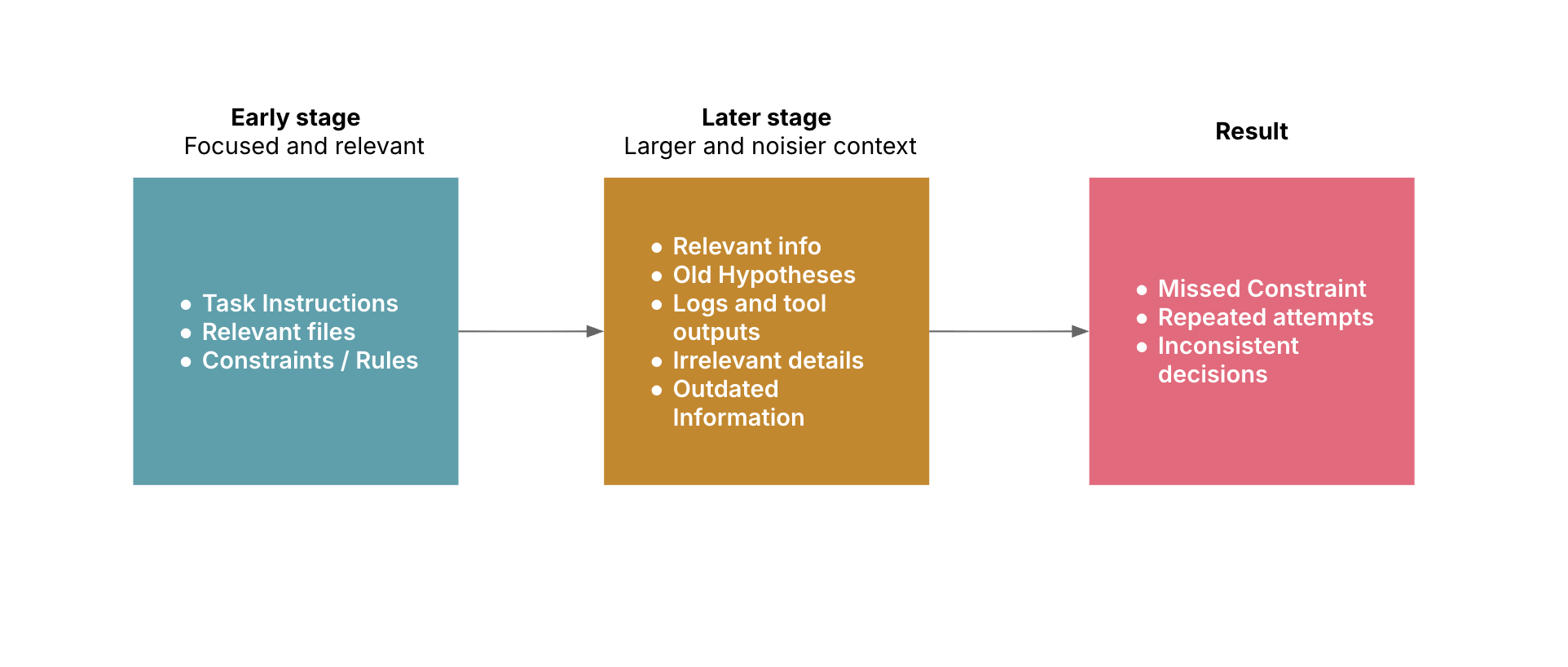
Context rot is the decline in an AI model's ability to use its context effectively as that context grows or becomes less relevant, noisy or difficult to navigate.
A long context window allows a model to process more information, but it doesn't guarantee that all of it will be used equally well. Old instructions, repeated tool outputs, irrelevant details and outdated results can compete with the information needed for the current step.
This matters especially for AI agents. Unlike a simple question-and-answer interaction, an agent may inspect files, call tools, observe results and make decisions across many steps. Its context changes throughout the task, and information that was useful earlier may no longer help.
The challenge isn't simply how much information a model can hold. It's how to keep the right information available at the right time.
A 2025 evaluation by Chroma tested 18 large language models and found that performance degrades as context length increases, even on controlled tasks.
Context rot isn't simply a consequence of having too much information. It's what happens when relevant information becomes harder to distinguish from everything else. Several factors can contribute:
Growing conversation history: Instructions, clarifications, decisions and previous attempts can all remain in the conversation. When an early hypothesis is ruled out, its details may still be present even though they no longer help solve the problem.
Noisy tool outputs: Tools can return far more information than the agent needs for its next decision. A test run, for example, might produce hundreds of lines when only a failing assertion and a few stack-trace lines are relevant.
Outdated or conflicting information: As the task progresses, assumptions change, plans are revised and files are updated. If older information remains alongside newer findings, the agent may have trouble identifying what is still true.
Loading too much information upfront: An agent may not need an entire repository or document collection to begin a task. Loading everything at the start uses context on information that may never become relevant. Retrieving details as they are needed can be a better fit for large codebases and knowledge collections.
Context-window limits: A context window limits how much input and conversation history a model can process in a single interaction. When space becomes constrained, a system may need to summarize, compact or truncate older content. These techniques help, but a summary can omit a subtle requirement and truncation can remove a detail that later becomes important.
Each of these factors creates a different problem, but the underlying challenge is the same: keeping the information an agent needs accessible without letting everything else get in the way. The question becomes what the agent needs for its next decision and what can safely be left out.
An agent can still produce fluent, confident responses while struggling to use its context. Look for patterns in its behavior, especially during longer tasks:
Forgetting earlier constraints: It ignores a requirement that was clearly established earlier.
Repeating failed approaches: It retries a solution without accounting for the previous failure.
Losing track of the current state: It relies on an outdated plan or overlooks recent test results.
Getting distracted by irrelevant details: It spends time on unrelated files or large tool outputs.
Making inconsistent decisions: Its actions conflict with earlier conclusions without a clear reason.
One mistake doesn't necessarily indicate context rot. An agent can misunderstand an instruction or make a reasoning error even in a short interaction. Look for a pattern: does the agent become less consistent or effective as the task and its context grow?
When investigating, inspect the context available before the agent made its decision. Was the relevant instruction present? Had newer evidence superseded it? Was useful information buried among unrelated history? These checks can help distinguish context-management issues from other causes of poor performance.
Context rot and context poisoning can both lead to unreliable agent behavior, but they describe different problems.
Context rot is about how effectively a model uses its context. Context poisoning is about misleading or harmful information entering that context.
For example:
Context rot: The agent has accumulated so many logs, file excerpts and previous attempts that it struggles to focus on the relevant error.
Context poisoning: The agent encounters an incorrect or malicious instruction in an untrusted file and treats it as trustworthy.
The problems can overlap. Outdated information may clutter the context and also mislead the agent if it treats that information as current.
The responses differ, too. Context rot calls for better selection and management of information. Context poisoning calls for source validation and safeguards for untrusted input. Reducing clutter won't automatically make misleading information safe, and validating sources won't prevent a context from becoming overloaded.
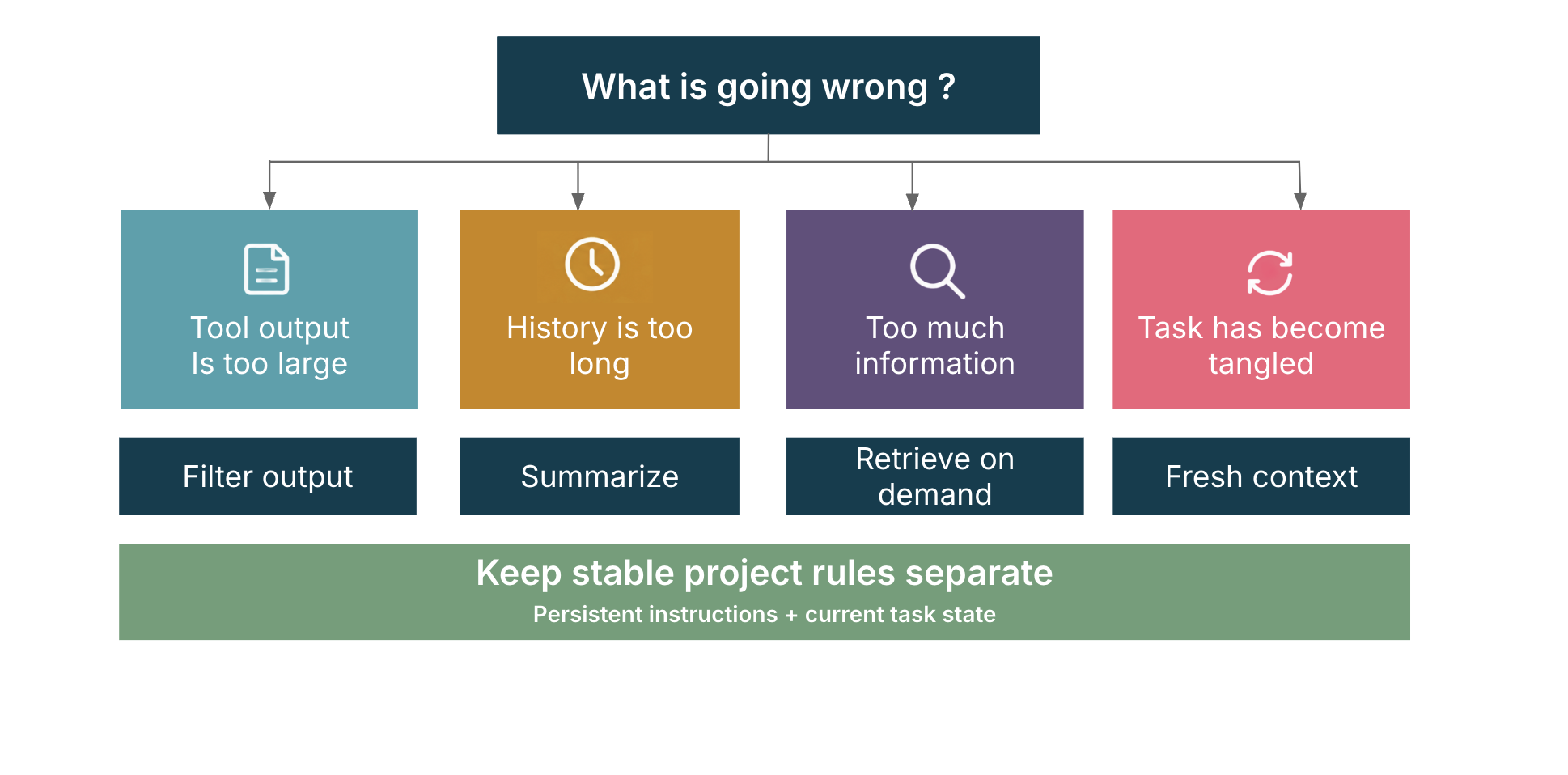
Fixing context rot isn't about giving an agent less information. It's about making sure it has the right information when it needs it. Several established context-management practices can help, including filtering tool outputs, summarizing task history and retrieving information on demand. Anthropic's context engineering guidance also explores approaches such as just-in-time retrieval, compaction and structured note-taking.
Extract the information relevant to the next decision instead of passing entire command outputs, files or logs into the model. When a test suite fails, the failing test, error message and relevant stack-trace lines may be enough to guide the next step.
Use it when: Tool responses are large, repetitive or mostly irrelevant.
Trade-off: Aggressive filtering can remove useful evidence. Keep enough surrounding detail to preserve meaning and allow further investigation.
A good summary does more than shorten the conversation. It gives the agent what it needs to pick up where it left off. For a coding task, that includes:
The goal and important constraints.
What has been investigated and established.
Which approaches failed and why.
Changes already made.
Open questions and next steps.
A summary such as "tried a few fixes, but the issue remains" isn't enough if it causes the agent to repeat work.
Use it when: A task spans many interactions and the full history is no longer needed.
Trade-off: Summaries can omit details. Preserve exact requirements, critical decisions and relevant evidence.
Instead of loading every potentially relevant file or document upfront, retrieve information as the task calls for it. A coding agent might start with the affected module and inspect dependencies as they become clear. A knowledge assistant might retrieve the relevant policy sections rather than include an entire document collection.
Use it when: The information pool is large, but only a subset is relevant at each step.
Trade-off: Retrieval can miss relevant material or return incomplete results. The system needs a way to discover related information and check whether the retrieved evidence is sufficient.
Keep stable project conventions separate from information that applies only to the current task. For coding agents, files such as AGENTS.md or CLAUDE.md can hold project-specific instructions, depending on the tool being used. Temporary details, such as a recent test failure or an unresolved debugging hypothesis, belong in the active task state.
Use it when: An agent works repeatedly in the same project or needs to follow consistent rules across sessions.
Trade-off: Persistent instructions can become outdated or contradictory. Keep them focused and review them periodically.
When an investigation becomes tangled or the agent moves to a different task, a fresh context can provide a cleaner starting point. Before switching, prepare a handoff with the goal, current state, important findings, relevant files, constraints and unresolved questions.
Use it when: The task has changed substantially, irrelevant history has accumulated or the agent keeps returning to outdated reasoning.
Trade-off: An incomplete handoff can lose useful details. Preserve the information needed to continue, rather than summarizing every step of the journey.
There's no single solution to context rot. Filtering, summarization, retrieval and fresh contexts each address different problems, and the right approach depends on what's getting in the agent's way.
Often, the most effective solution combines several techniques. The objective isn't the smallest possible context. It's one that helps the agent make better decisions.
Knowing how to manage context is one thing. Making those decisions consistently, across multiple tools and potentially hundreds of interactions, is another.
That's where an agent harness becomes important.
A prompt can tell a model what to do, but it doesn't by itself implement the runtime process around the model. The surrounding software needs to collect tool results, manage task state, decide what information to retain and prepare context for subsequent model calls. An agent harness provides the components and control logic for coordinating that workflow.
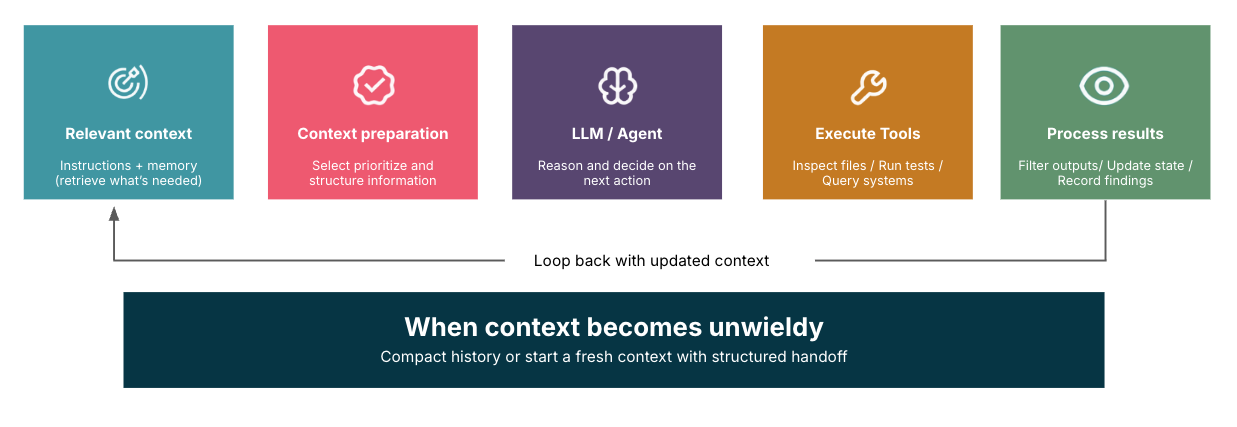
A harness can manage context at several points:
Before a model call: Select relevant instructions and retrieve information needed for the current step.
After a tool call: Filter or structure the result before passing it back to the model.
As the task progresses: Update task state and preserve important decisions, evidence and unresolved issues.
When context becomes unwieldy: Compact history or start a fresh context with a handoff that retains the essential details.
Rather than relying entirely on the model or requiring developers to intervene manually, a harness can apply rules and coordinate supporting components throughout the workflow.
Its responsibilities extend beyond context management. An agent harness can also coordinate tool execution, manage workflows, handle errors, enforce limits and support evaluation. Together, these capabilities make agent behavior more consistent, observable and easier to troubleshoot.
When assessing an agent harness, ask:
Relevant context: Does each model call receive the instructions and information needed for its current step?
Controlled tool outputs: Are large responses filtered or structured before they are reused?
Task state: Can the agent track completed work, key decisions, failed approaches and open issues?
Context refresh: Can the system summarize or reset context without losing critical information?
On-demand retrieval: Can it fetch additional information when needed?
Persistent instructions: Are stable project rules kept separate from temporary task details?
Observability and evaluation: Can you inspect what context the agent received and assess whether changes improve task outcomes?
Not every agent needs every capability from the outset. Start by identifying where context management is affecting performance, then introduce the controls that address those problems. The goal is to build a more reliable agent, not a more complicated one.
More context doesn't guarantee better results. Long histories and noisy tool outputs can make relevant information harder to use.
Context rot and context poisoning are different. One concerns the effective use of context; the other concerns misleading or harmful information entering it.
Choose fixes based on the problem. Filtering, summarization, retrieval, persistent instructions and fresh contexts have different purposes and trade-offs.
An agent harness makes context management part of the runtime. It can coordinate what enters the model's context, how task state is maintained and when context should be refreshed.
Evaluate outcomes, not just context size. The goal is more reliable task completion, not simply fewer tokens.
Context rot is the decline in an AI model's ability to use its context effectively as that context grows or becomes less relevant, noisy or difficult to navigate. It can make it harder for an agent to follow instructions, use earlier findings and make consistent decisions.
Keep context relevant, filter unnecessary tool outputs, summarize long-running tasks, retrieve information when needed and preserve important task state. If a task becomes tangled, start a fresh context with a clear handoff summary.
No. Context rot concerns how effectively a model uses its context. Context poisoning occurs when misleading or harmful information enters the context and influences the model. The problems can overlap, but they require different safeguards.
Context poisoning happens when misleading, incorrect or malicious information enters an AI agent's context and influences its decisions. For example, an agent might encounter an untrusted instruction in a file and follow it instead of the user's actual requirements. Source validation and careful handling of untrusted input can help reduce this risk.
Context pollution is the accumulation of unnecessary, repetitive, outdated or irrelevant information in an agent's working context. For example, an agent might retain lengthy logs and failed debugging attempts long after they stop being useful. Filtering outputs, summarizing history and retrieving information on demand can help reduce that clutter.
An agent harness can implement context-management policies around model calls. It can filter tool results, retrieve relevant information, maintain task state, compact history and prepare a fresh context when appropriate. This makes context management part of the agent's runtime workflow.
Not by itself. A larger context window lets a model process more information, but it doesn't guarantee that the information will be used effectively. Relevance, organization, retrieval and task-state management still matter.
Disclaimer: The statements and opinions expressed in this article are those of the author(s) and do not necessarily reflect the positions of Thoughtworks.