














Architecture
Techniques for cross micro frontend communication


Sometimes, getting technology to work together isn’t so much an issue of technical integration, but one of information management. Yes, sometimes a fully integrated system that manages various parts of a workflow neatly and seamlessly is ideal, but that’s not always possible — instead, ensuring there is easy to access information so people can use different applications successfully and efficiently can solve many of the challenges that a re-architecture would solve much faster.
This is something we learned when doing work with a client in the retail sector. Specifically we were looking at the logistics and warehouse systems used by the client, which consisted of a number of different elements: an application to manage inbound inventory, one to assess its quality and another to lodge complaints and returns to suppliers.
Working across these systems was frustrating — something we both heard from employees at the client and from our own first-hand experience working with these systems. Subsequently, this drove us to seek a rapid solution that could help alleviate the pain points of understanding how each of these different systems should be used together.
Because the challenge was ultimately an information or knowledge management one, we turned to generative AI. We’ve seen in a number of projects across Thoughtworks that generative AI can prove particularly helpful for improving access and discoverability of information; we developed a tool called DocuBrain. It was essentially a chat application that brought together existing information sources for the different applications and allow employees to ask questions about how they should be used.
It all began with a simple idea: to build a document-grounded conversational AI assistant. The goal was straightforward: allow users to upload PDF, DOC, or TXT files (user guides eventually) and then have a natural conversation with the document. They should be able to ask questions, get summaries and receive contextual responses based solely on the document's content, powered by a Retrieval-Augmented Generation (RAG) approach.
One important detail: this project didn’t just deliver an AI-backed application — it was created by AI too. Given team constraints and expertise, we built a large part of the project using AI assistants. (At the time, ChatGPT 3.5 was the most popular and widely accessible option.) So, when I say “we did this,” at times, it refers to ChatGPT and me working together in collaboration.
The process is worth going through step-by-step. Here’s how we did it:
We started with PDF parsing, although quickly discovered it's one of the hardest formats to extract clean, readable text from. Extracted content came out with broken structure, jumbled words (like Beabletotakestrongcalls) and zero formatting.
To fix this, I ended up building a custom utility using Python. This parsed the document block-wise and generated a cleaner output file with vastly improved text structure, making it suitable for downstream NLP tasks.
Initially, I split text based on token length (512-token chunks), but that broke context and produced unnatural chunks. I then integrated sentence-based chunking using NLTK’s sent_tokenize, but downloading the required punkt tokenizer failed due to SSL/certificate issues on a restricted environment. As a fallback, I tried to implement regex-based sentence detection to chunk text semantically while keeping size under limits.
I used HuggingFace’s sentence-transformers/all-MiniLM-L6-v2 to generate embeddings for each chunk. These were stored in a file, enabling fast semantic search for future queries. However, I ran into a limitation with the transformer model: some chunk sizes exceeded the 512-token cap.
To tackle this I tuned the chunking logic for tighter, cleaner chunks. Now that the core was ready it was time to expose this via an API.
It was now the turn to building a working backend using FastAPI. This was a major milestone: it enabled an end-to-end interaction loop with endpoints for:
Uploading documents
Parsing and chunking
Generating embeddings
Accepting user questions
Returning contextually grounded answers
I thought this was it, I've nailed it — all I needed, I thought, is a frontend and we’ll be good to roll. But the results of testing the APIs were a disaster.
I ended up switching the embedding generation model within the RAG pipeline — moving from a basic chunking and embedding approach to a more refined NLP-based chunking and sentence-level parsing for better context capture.
Originally, HuggingFace models were used for both embeddings and summarization. But we noticed issues: slower inference, cluttered responses and inconsistent formatting. That’s when I made a strategic switch to OpenAI’s gpt-3.5-turbo, using it to synthesize responses from retrieved document chunks. This improved fluency, clarity and formatting immediately. HuggingFace remained for embeddings to keep costs low (because I was using OpenAI APIs at a cost per usage) and performance high.
The complete modular flow now looks like this:
Upload → via FastAPI, It’s then Parsed using Python
Chunk → using regex or sentence-based strategy
Embed → using Sentence Transformers
Query → FastAPI endpoint retrieves top chunks, invokes OpenAI for final response
While the backend was robust and working well, the frontend was still pending. The next logical step was to wrap it with a UI — either a simple React app or a web-based assistant—to make it more user-friendly. That’s where Claude came in. I had a basic design sketched out in Figma and started with a simple idea, then watched Claude generate a complete, usable UI in under 10 minutes — it was absolutely mind-blowing.
Through iterative prompting, we evolved the basic components into a polished React interface, complete with drag-and-drop file uploads, chat bubbles and smooth animations. We then seamlessly integrated it with the FastAPI backend, powered by OpenAI's embeddings.
The result? DocuBrain — a Proof of Concept for document intelligence application that transforms static PDFs into interactive conversations. Built entirely through AI-assisted development, it proved that with the right conversations, you don’t just write code—you build software that’s great for having that first conversation and make selling ideas a lot easier.
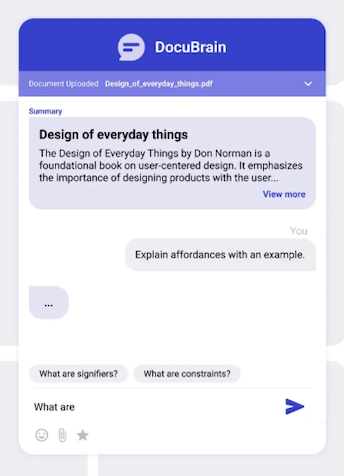
This was one of my earliest attempts at using AI not just to write code, but to build a working solution prototype, something people could actually interact with, explore, and experience end to end. It went beyond static screens or conceptual mockups and demonstrated how an idea could move from intent to a usable product through iterative collaboration between human judgment and AI capability.
Since then, this space has expanded at an incredible pace. New tools now promise to generate interfaces, workflows, and full applications from simple prompts. The distance between product vision and working software has reduced dramatically. What once required weeks of engineering effort can now be prototyped in hours.
Yet, this experience also made one thing very clear. AI can accelerate execution, remove friction, and make experimentation easier, but it does not replace the need for human thinking. The decisions around what to build, why it matters, how it should behave, and when something is truly useful still rely on human understanding.
DocuBrain was not just a proof of concept for document intelligence. It was a proof of a new way of building, where AI becomes a collaborator in translating ideas into tangible software. The tools will continue to evolve, and the gap between idea and implementation will keep shrinking. But the role of the human in the loop, providing direction, context, and judgment, remains essential.
Disclaimer: The statements and opinions expressed in this article are those of the author(s) and do not necessarily reflect the positions of Thoughtworks.