













Generative AI
Building for intent: What it takes to become an intent-ready organization


A practitioner’s guide to developing, testing and securing ChatGPT Apps using the Model Context Protocol (MCP).
The Age of Intent series so far has explored how businesses, designers, and technologists can prepare for a world where users express goals, not clicks. This piece moves into the engineering layer — where that vision meets real implementation.
Since the Apps in ChatGPT SDK was announced, our teams at Thoughtworks have been experimenting with the ChatGPT App SDK and the Model Context Protocol (MCP) — exploring what it takes to build, test and secure custom integrations for intent-driven experiences.
We examined the SDK from four lenses:
Developer experience. How intuitive is it to use and extend?
Quality assurance. How can apps be tested and integrated into CI/CD pipelines?
Security boundaries. What controls exist to limit exposure?
Data. How should APIs and data schemas evolve for intent-driven use cases?
This article shares our observations — the good, the rough edges and what we’d recommend to teams starting their own journey.
Our exploration wasn’t a production build — it was a working prototype designed to test how the ChatGPT App SDK and Model Context Protocol (MCP) behave in practice. We wanted to understand the development experience, integration patterns and where the rough edges appeared.
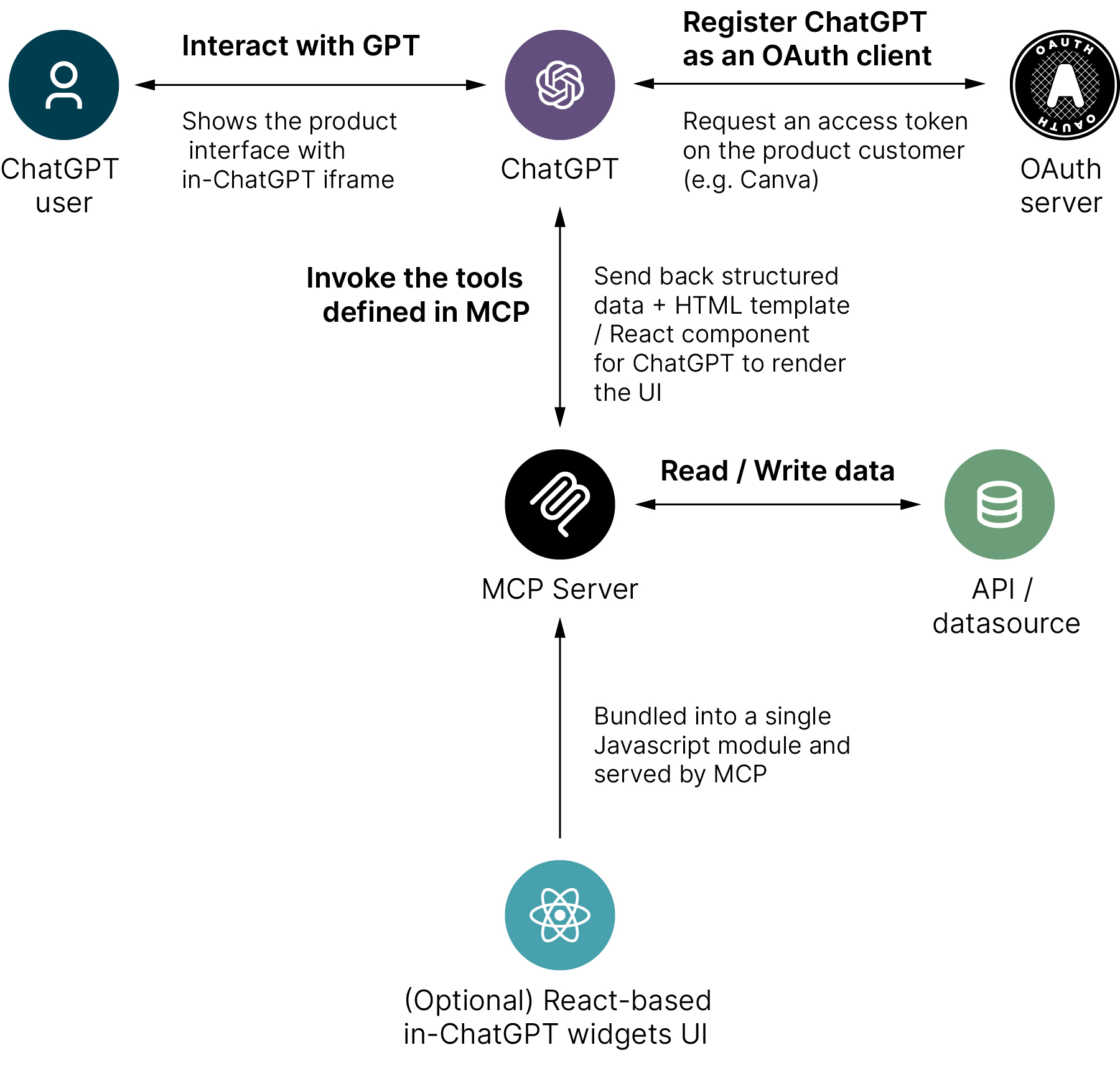
The prototype had four main components (illustrated below):
ChatGPT interface. Where the user interacts conversationally and invokes tools defined in the MCP.
MCP Server. A Python-based MCP server (built with Uvicorn) that handled filtering logic and returned structured data.
Dummy data layer. A simulated API/data source, represented by in-memory data structures.
React UI. A lightweight front-end built using the ChatGPT SDK to render responses and components.
We deliberately didn’t enable authentication for this experiment, focusing instead on the developer experience and context-based data filtering.
We started with realistic data structures similar to those used in enterprise APIs but simplified them for the purposes of the demo. This let us concentrate on filtering and intent-handling. We used ChatGPT to generate a large synthetic dataset after we provided a few representative examples.
In a client context, where we’d have access to non-production data and live APIs, we would take the time to wire and restructure existing endpoints in the Python MCP layer. That would allow the prototype to demonstrate richer, domain-specific interactions while maintaining security and realism.
We ran the prototype locally but exposed our MCP server to MCP Jam and ChatGPT’s developer mode using ngrok, which made it easy to test end-to-end flows without deploying to a public environment. That setup let us iterate quickly while keeping all components under local control.
On the front end, the UI was a React app built from the ChatGPT SDK example templates. Setup was straightforward, and since it followed typical React patterns, it would be easy to integrate an existing design system or branding. For the prototype, we kept the visual styling minimal to focus on functionality.
Figure 1: Simplified ChatGPT App SDK integration flow
The ChatGPT App SDK is still very much in flux — new builds and conventions are evolving week by week. That means the way you interact with it can change unexpectedly. For example, when we began our prototype, tool output was injected directly into a component, but later updates switched that behavior to fire on an event instead.
Even with that fluidity, it was simple enough to use. The OpenSDK examples and MCP documentation are clear, and the SDK works smoothly with modern frameworks such as React, Next.js, and FastAPI.
However, while it’s technically approachable, it’s not conceptually turnkey. Developers must think in conversational logic, not screens and clicks.
The SDK integrates naturally with standard UI frameworks.
Documentation and samples are detailed and pragmatic.
There’s a learning curve — the mental model of “conversation as interface” doesn’t map neatly to component-based design.
In many cases, you’ll need to design a ChatGPT-first UI, not just port an existing web app.
If your app depends on step-by-step workflows, prototype a simplified intent-first variant instead of replicating every input field. Ask: What’s the minimum structured data ChatGPT needs to complete the intent?
One of the pleasant surprises is how testable MCP-based apps are. Most of the engineering fundamentals still apply — unit tests, integration tests, and CI/CD automation all work as expected. MCP itself can even be tested in isolation using mock clients or the MCP Server Unit Test Guide.
That said, our hands-on testing surfaced a few practical hurdles. Because our organization uses ChatGPT Business, it initially took some time to work out how to enable developer mode — the required settings simply weren’t visible in non-admin accounts. We eventually got there by working with our admin, who enabled it from their account. That allowed us to get the prototype running.
When we returned the following week, however, OpenAI changed the plan entitlements, and Business and Enterprise plans could no longer enable developer mode at all. That update effectively broke our setup overnight and made true end-to-end testing inside ChatGPT impossible.
We still made good progress by using MCP Jam for local development and integration testing. It gave us a stable sandbox to validate our MCP logic and SDK behavior without depending on ChatGPT itself. Along the way, we also needed to update a few dependencies — notably FastMCP — as the ecosystem evolved.
Standard CI/CD pipelines and testing tools (Jest, pytest, Cypress) can be reused.
MCP Jam dramatically simplifies local testing.
Front-end assets behave like typical web projects, so automation is straightforward.
Platform updates and plan restrictions can disrupt testing unexpectedly.
Integration issues often stem from data contract mismatches between UI and MCP layers — communication still beats configuration.
Use MCP Jam for contract testing before deploying to ChatGPT.
Keep MCP schemas versioned and shared across teams.
Budget time for SDK and dependency updates — the platform is changing quickly.
Security in an intent-driven world is about contextual containment — ensuring AI agents only access what they need, when they need it.
MCP’s architecture encourages this:
Each app explicitly defines accessible data sources.
OAuth integration enables fine-grained token scopes.
Sensitive data stays protected behind existing API gateways.
In practice, your MCP server can delegate security to existing APIs, maintaining audit and authentication policies while still exposing least-privilege interfaces to ChatGPT.
OAuth2 and scope validation work well in both FastMCP (Python) and TypeScript SDKs.
Using IDs and references instead of raw data reduces risk.
Prompt-injection and cross-context vulnerabilities remain possible — treat any generated content like unescaped HTML.
Think of your MCP as an API gateway for ChatGPT — it’s the controlled bridge between the model and your internal systems. It should sanitize inputs, enforce scopes and manage what data moves across that boundary. But it’s more than a security layer. The MCP acts as both proxy and policy point, shaping data for meaning while keeping access least-privilege and auditable.
If there’s one standout insight from working with the SDK, it’s that ChatGPT doesn’t want your data — it wants your meaning. APIs built for frontends typically return terse, ID-based data. Intent-driven systems need context-rich, semantically meaningful structures.
Self-describing data (names, relationships, usage hints) improves ChatGPT’s reasoning.
The MCP can act as a translation layer, shaping existing APIs into intent-friendly outputs.
Adding lightweight domain descriptions (“this field represents a scheduled flight departure time”) significantly improves accuracy.
Legacy APIs often lack the contextual metadata ChatGPT needs to reason effectively.
Design MCP responses as if you’re teaching the model your domain. Include description, context, and relationship fields generously. If the model understands your data, it can reason with it.
The SDK is an impressive foundation — open, flexible, and rapidly evolving.
Our biggest takeaway: building for intent isn’t just about new interfaces; it’s about new assumptions.
Teams need to:
Shift from API design to meaning modeling.
Treat the MCP as both gateway and guardrail.
Build observability and governance into the same pipelines as their code.
If you’re experimenting with the ChatGPT App SDK today, think of it like the early web: the patterns are still forming, and you have a chance to shape them.
This article concludes our Age of Intent series — a journey from concept to code, exploring how organizations can prepare for a world where users express goals, not clicks. While this marks the end of the series, it’s only the beginning of the conversation. As tools like the ChatGPT App SDK evolve, we’ll continue sharing what we learn about designing, building, and scaling systems that act on human intent.
Disclaimer: The statements and opinions expressed in this article are those of the author(s) and do not necessarily reflect the positions of Thoughtworks.