














Generative AI
Engineering the harness: A practical pattern for reliable coding agents


AI agents can do more than answer questions. A coding agent can read a repository, edit files, run commands and inspect test results. But the model is only part of what makes that possible
An AI agent harness provides the surrounding software that helps it get work done.
For developers and AI practitioners, this guide explains how harnesses work, the role of context, tools, state and feedback, and what to consider when building one.
An AI agent harness is the software environment around an AI model that gives the agent the context, tools, rules, state, and feedback it needs to actually get work done.
A simple way to think about it is:
LLM = The brain.
Harness = What gives it the environment and ability to act.
Agent = The model working through that environment.
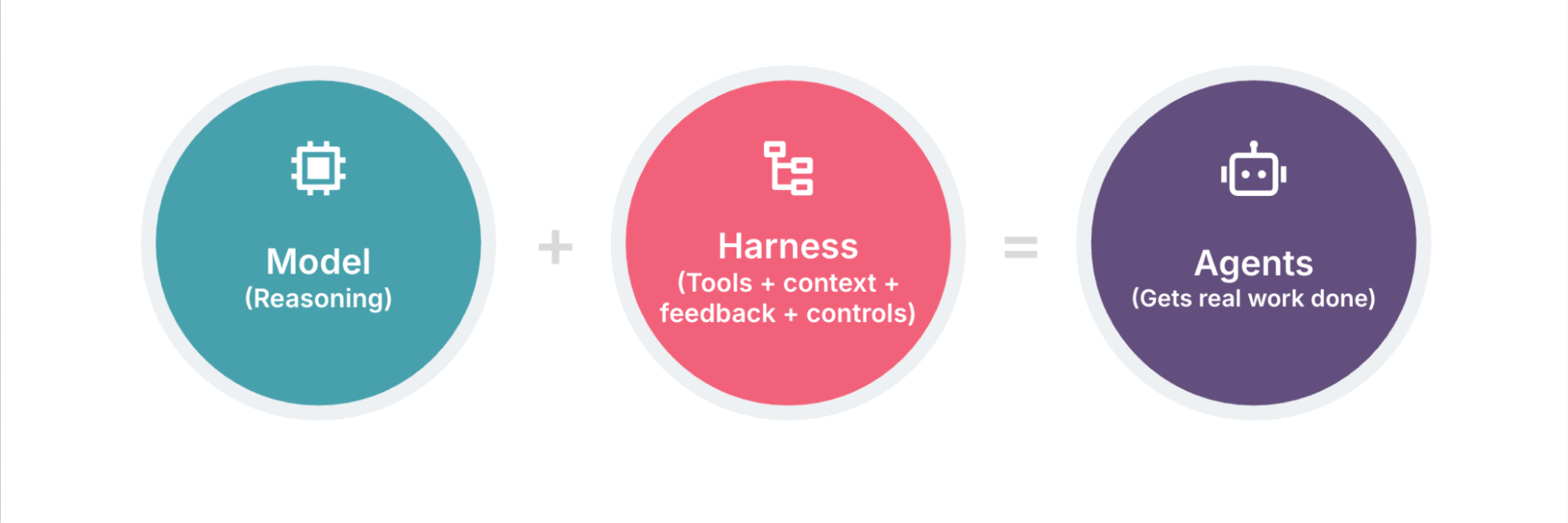
Birgitta Böckeler uses a similar way of explaining this relationship in her discussions on harness engineering. She describes the LLM as the core and the harness as the surrounding layer that brings together tools, prompts, and other mechanisms that make the model more useful for real work.
A better model does not automatically mean a better agent. The environment around it matters too.
A model can reason about a problem and still struggle to complete the task.
Take this request:
“Fix the authentication bug in this application.”
Identifying a possible fix is a start. Applying and checking it raises more questions:
Where is the authentication code?
What framework and conventions does the project use?
Which files should be changed?
What commands should be run?
How should the fix be tested?
How does the agent know the problem is really fixed?
What should happen if the first solution does not work?
A single prompt cannot provide all of this.
The harness provides the structure around the task. It can tell the agent how the project works, give it access to tools, run checks, preserve useful state, and provide feedback when something goes wrong.
That is what makes an agent more than an LLM responding to a prompt.
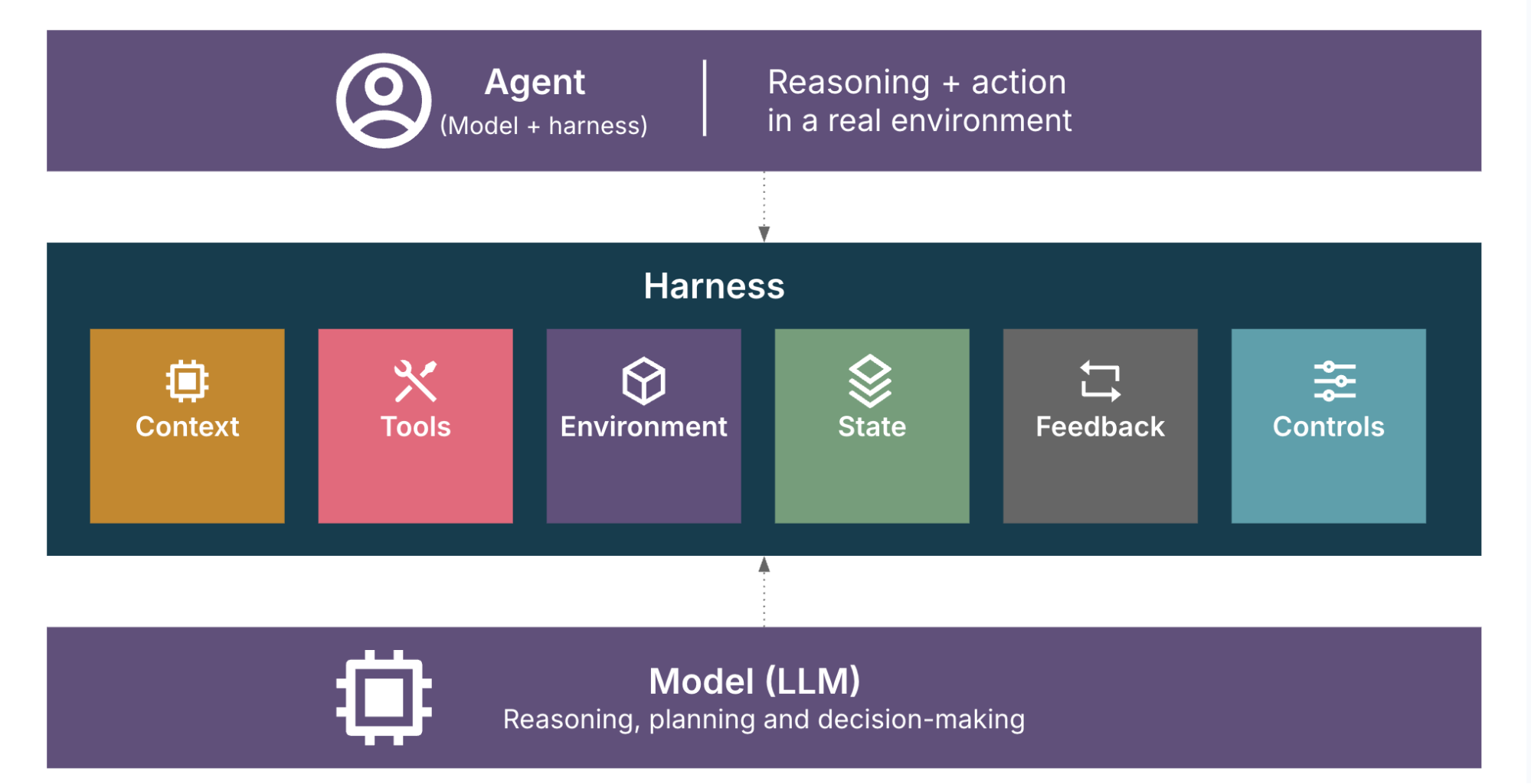
There is no single component called a harness. It’s better to think of it as a collection of things working together.
Projects often have their own conventions and rules.
For example, an engineering repository might tell an agent via a system prompt:
Which coding standards to follow
How the application is structured
Which commands to use
How tests should be run
Which parts of the repository need special care
This guidance helps the agent follow the project’s conventions.
It also introduces context engineering: selecting, structuring and maintaining the information an agent needs within its limited context window.
The aim is to make essential rules clear and detailed information easy to find when needed. A longer instruction manual is not automatically a better one.
An agent becomes much more useful when it can interact with its environment.
A harness may give it access to:
Files and repositories.
A terminal.
APIs.
Databases.
Browsers.
Testing tools.
Build systems.
The model can decide that it needs to inspect a file or run a test. The harness gives it a safe and practical way to perform that action.
These interactions are often handled through tool calls. The agent decides which tool it needs, the harness executes it, and the result is returned to the model as new context.
An agent framework or agent SDK can provide building blocks for defining agents, connecting tools and managing interactions with the environment. These components can form part of a larger harness.
Tools alone are not enough. The agent also needs an environment where those tools work as expected.
That might include the correct runtime, dependencies, configuration, project structure, and access permissions.
For example, an agent that needs to run a Python project should know how that project is bootstrapped and which environment it is expected to use.
In a production harness, these considerations become even more important. The environment may also need stronger isolation, access controls, monitoring, and clear boundaries around what the agent can execute or modify.
Some tasks are too large to finish in one interaction.
An agent may need to stop, resume later, or work through several stages. The harness can preserve useful state such as:
What has already been completed.
What is still pending.
What failed.
What needs to be checked next.
Even a simple progress file can be useful here.
The larger the task, the more important continuity becomes.
This is one of the most important parts of an agent harness.
An agent should not make a change and simply assume that it worked.
A harness can connect the agent to a feedback signal such as:
Unit tests.
Integration tests.
End-to-end tests.
Linters.
Type checks.
Static analysis.
Build results.
The agent makes a change, gets the result, and decides what to do next.
That creates a feedback loop:
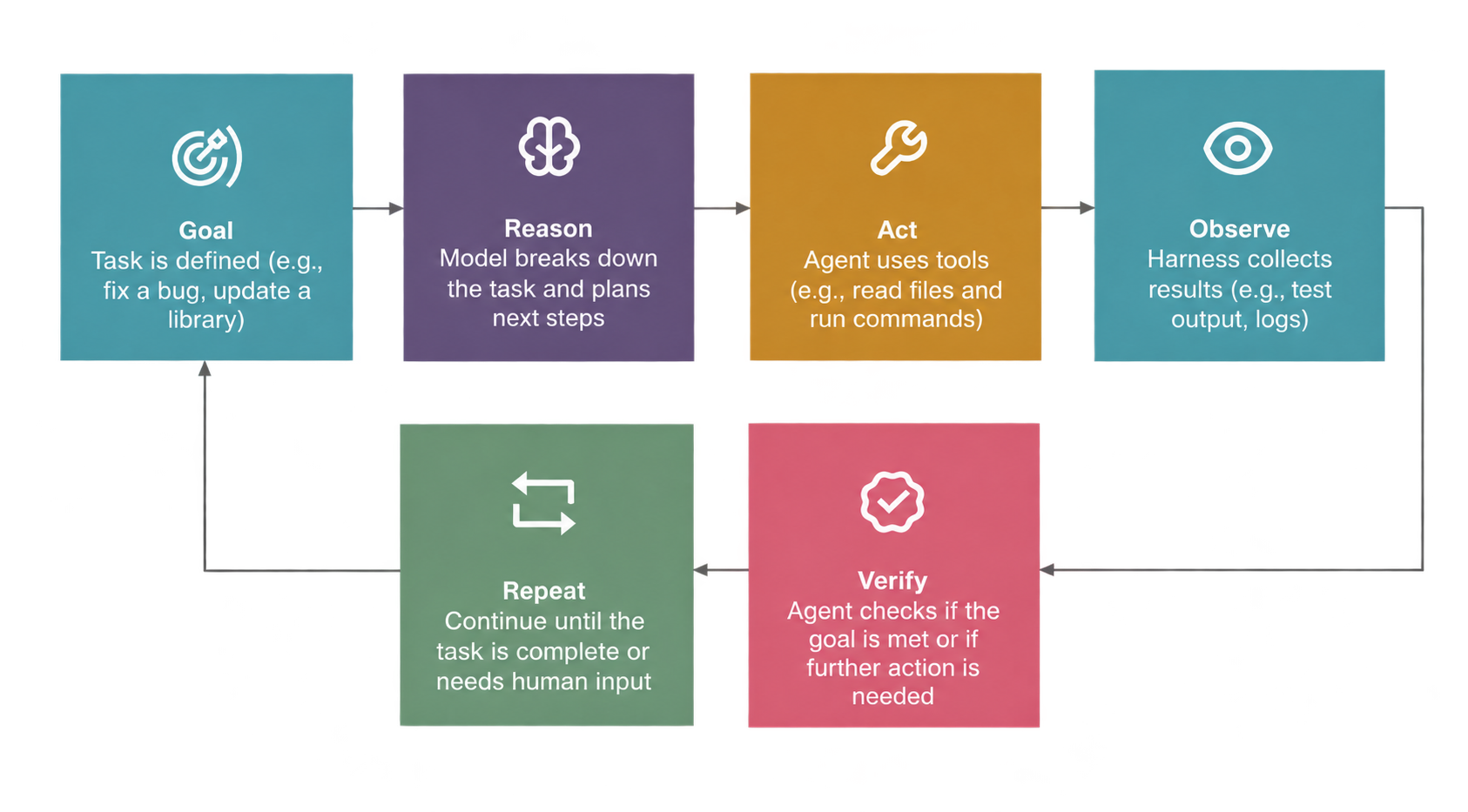
Reason → Act → Observe → Verify → Repeat
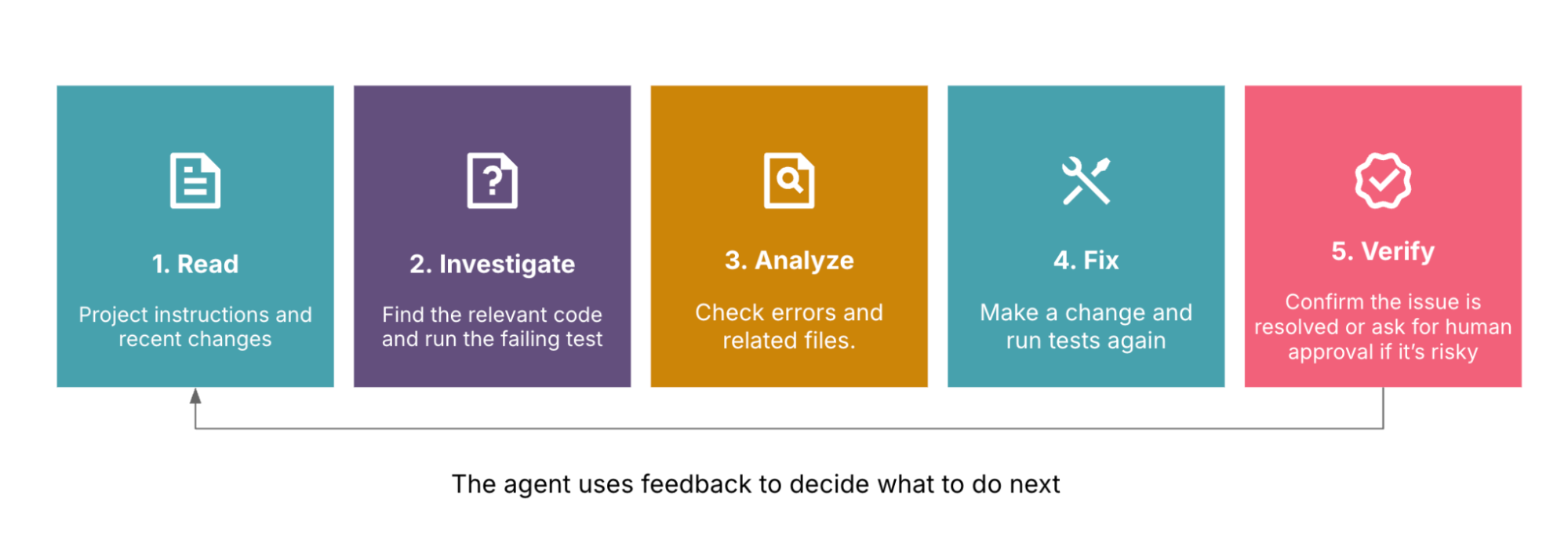
These feedback loops allow the agent to use the result of one step to decide what to do next. The more useful and timely the feedback, the less the agent has to rely on guesswork. For a related technique, see the Technology Radar’s feedback sensors for coding agents.
An autonomous agent should not necessarily have unlimited access.
A harness can control which tools are available, which resources can be accessed, and what kinds of actions are allowed.
For some actions, the system may also need a human in the loop. For example, an agent might be allowed to modify code and run tests automatically but require human approval before deploying to production or changing sensitive data.
This is especially important for production systems, sensitive data, and workflows where mistakes are expensive.
The goal is not to remove autonomy. It is to give the agent enough freedom to do the job without giving it unnecessary freedom to do the wrong thing.
No. The exact shape of a harness depends on the kind of agent and the task it is expected to perform.
For a coding agent, the harness might include:
Repository access.
Terminal tools.
Code search.
Language-server support.
Project instructions.
Linters and tests.
For a research agent, the environment could instead include:
Web search and browsing.
Document retrieval.
Source validation.
Citation tools.
Research-specific workflows.
For an enterprise agent, the harness may also need:
Access controls.
Internal knowledge sources.
Audit logs.
Approval steps.
Security policies.
So there is not one universal checklist that defines a harness.
The important question is:
What does this agent need around the model to complete its job reliably?
That answer determines the harness.
At a high level, an agent harness creates a working loop around the model.
Imagine an agent is asked to fix a failing test.
First, it gets the goal.
Then the model reasons about what it needs to investigate.
The harness gives it access to the repository and terminal.
The agent reads the relevant files, makes a change, and runs the test.
The test fails.
That failure becomes feedback.
The agent reasons about the result, changes the implementation, and runs the test again.
Eventually, the test passes and the agent can move on.
So the workflow looks like this:
Goal → Reason → Act → Observe → Verify → Repeat
This feedback loop is a useful way to understand why a harness matters. It gives the model a way to interact with the real world and learn from what happens after each action.
AI Agent ≈ Model + Harness
Consider a developer who asks an agent:
“Upgrade this application to the latest version of the library and fix anything that breaks.”
A basic workflow might be:
Read the project instructions.
Inspect the current dependency and code.
Identify the relevant files.
Use an appropriate refactoring or code-change tool.
Run the tests and static checks.
Inspect the failures.
Fix the remaining issues.
Run the checks again.
Summarize the changes.
Notice that the LLM did not do all of this by itself.
The model provided the reasoning, while the surrounding environment provided the repository, tools, instructions, tests, and feedback.
That surrounding system is the harness.
Tools such as Claude Code, built on the Claude Agent SDK, provide a useful example of this idea in practice. A coding agent can work with a repository, use tools, execute commands, inspect results, and continue working based on what it observes. The surrounding capabilities and project-specific setup form an important part of the environment in which the model operates.
As agents take on larger tasks with less supervision, evaluating their work becomes more demanding.
For a chatbot, you might ask:
“Did the model give a good answer?”
With an agent, the questions become broader:
“Did it use the right tools?”
“Did it follow the project rules?”
“Did it verify the result?”
“What happened when something failed?”
“Can we trust it to continue without constant supervision?”
A well-designed harness helps answer these questions by increasing the chances of a good result and catching problems earlier.
Good engineering practices that existed long before AI—testing, static analysis, clear architecture, documentation, observability, and continuous feedback—can all become part of this environment.
That is one reason harness engineering feels both new and familiar. The tools and terminology are changing, but many of the underlying ideas are not.
Moving from a demo to everyday use means deciding what the agent needs to work reliably. Start with these five considerations.
Ask:
What information does the agent actually need?
Where should that information come from?
What can be retrieved when needed instead of being included all the time?
What happens when the context window starts getting large and the context rot sets in?
Good context is not about giving the agent more information. It is about giving it the right information at the right time.
If an agent can execute code, modify files, call APIs, or access internal systems, think about where those actions happen.
For example:
Can code execution happen in an isolated environment?
Which files can the agent modify?
Which APIs can it call?
What permissions does it actually need?
The more powerful the tools, the more important these boundaries become.
Not every action needs the same level of control.
An agent might be allowed to:
Read source code.
Create a branch.
Run tests.
Make local changes.
But actions such as deploying to production, deleting data, or changing sensitive configuration may require additional checks or a human in the loop.
The harness should make these boundaries explicit.
Agents will make mistakes. The important part is being able to understand what happened.
Capture useful information such as:
Tool calls.
Errors.
Model responses.
Test results.
Agent decisions.
Task outcomes.
This makes debugging and improving the harness much easier.
A model benchmark does not necessarily tell you how well your complete agent works.
Evaluate the whole system:
Model + Context + Tools + Instructions + Feedback + Environment
For example, measure whether the agent can actually complete representative tasks, how often it needs human intervention, where it gets stuck, and whether feedback helps it recover from failures.
This is where the harness itself becomes something you continuously improve.
The concepts become easier to understand when you start building an agent. In practice, a few things quickly become important:
Context: Give the agent the information it needs without overwhelming its context window.
Tools: Start with the tools required for the task and make their permissions explicit.
Safety: Run code and other risky actions in controlled environments, with approvals where needed.
Feedback: Connect the agent to tests, checks, and other signals so it can verify its work.
Observability: Keep track of tool calls, failures, and outcomes so you can understand what the agent actually did.
Evaluation: Test the complete agent on realistic tasks, not just the underlying model.
A simple way to think about it is:
Build the environment → Give the agent useful tools → Let it act → Check the results → Learn from what happened.
The exact setup will vary by use case, but these practical considerations are what turn a simple agent demo into something that can be used more reliably.
Disclaimer: The statements and opinions expressed in this article are those of the author(s) and do not necessarily reflect the positions of Thoughtworks.