












Architecture
The evolution of data lake table formats


The methodology described in Evolutionary Database Design and operationalized in Refactoring Databases: Evolutionary Database Design has been clear for twenty years. The seven practices, the catalog of 70+ named refactorings, the transition mechanics — all of it is documented, peer-reviewed and now taught.
That methodology reached CI/CD in 2010 with Continuous Delivery (Chapter 12: Managing Data). Migrations became first-class artifacts in the deployment pipeline. The discipline of database-changes-as-code reached the broader CI/CD movement. What CD didn't solve was per-pipeline isolation: pipelines could run migrations, but they still needed a target database, and that target was shared. Practice #4 — Everybody gets their own database instance — has stayed aspirational on most teams because true per-developer production-shaped databases cost time, money and DBA cycles. The compensating layer that emerged to work around the gap (mock objects, shared staging environments, in-memory database substitutes and DBA ticket queues) became foundational methodology by default, not by design.
In 2026, copy-on-write database branching arrives in Databricks Lakebase. A one-second, zero-storage-at-creation branch of a terabyte-scale production database is now an O(1) operation. The constraint that kept Practice #4 aspirational has been lifted.
This series describes what changes when the constraint lifts: not the methodology – that holds – but the practices that emerge for the first time, the team-scale governance that becomes automatic, the role evolution for the DBA and the new substrate that agents share with their human counterparts.
Jen is the developer character from Evolutionary Database Design. In that essay she refactored a database — splitting an inventory_code field into location_code, batch_number and serial_number — as a routine user story, illustrating that DBAs and developers can collaborate, schemas can evolve in small increments and migrations carry the change forward safely.
The series picks up with Jen twenty years later. The methodology she follows is the same one she followed in 2003. What's new is the substrate underneath her workflow: copy-on-write database branching, which makes the practices she’s been reading about operationally real at production scale. Each part of this series looks at Jen in three different contexts: her day (Part 1), her new playbook (Part 2) and her team (Part 3).
To understand how this works, let’s walk through the journey that Jen goes through to implement a task that states the user should be able to see, search and update the location, batch and serial number of a production in inventory.
The following describes the various steps Jen has to take to accomplish this task. As we describe them, we’ll also compare how Jen's workflow changes when working with traditional databases and using Lakebase, which allows database branching at minimal cost.
Jen picks up what looks like a straightforward feature. The product team wants to allow users to capture location, batch and serial number of an item during inventory addition and use it later in the application flow. From the outside, the change feels small: add a field to the screen, save the value, show it in the inventory screen for an item and maybe use it in a downstream decision later.
For Jen, the application change is easy to picture. She knows where the form lives. She knows which service handles the request. She can see the model object that needs more attributes. But the moment she traces the change all the way through, she sees the real dependency: the database has to change too.
Some new columns are needed, existing data in the production environment needs to be preserved and has to be semantically correct. The application must handle old and new data safely and she needs to add tests to prove the new fields are stored, read and displayed correctly. What looked like a simple feature is now a coordinated application and database change, with the added responsibility of ensuring existing production schema and data is migrated to the new schema.
Jen creates a code branch for the work she is about to embark on, and since they’re using a shared database and the rest of the team is using the same database for development, she immediately starts thinking about all the changes she’s going to introduce in the database layer that could affect other users of the shared database and starts planning on how she can make it safe for others. Could she make the application change locally and be able to run her unit and integration tests? Each option has costs. She can wait; she can ask the team to coordinate; she can stand up her own local Postgres in Docker, seed it with a stale pg_dump from a week ago, and hope the differences don't matter. She can fall back running a local database in a container or to an in-memory database H2 or SQLite that runs fast but uses the wrong dialect, so her tests pass locally and surface unknown failures on real Postgres. Can she even test her schema and data migration scripts? This fear of breaking others slows her down and at the same time doesn’t allow her to experiment with multiple ways of building the feature.
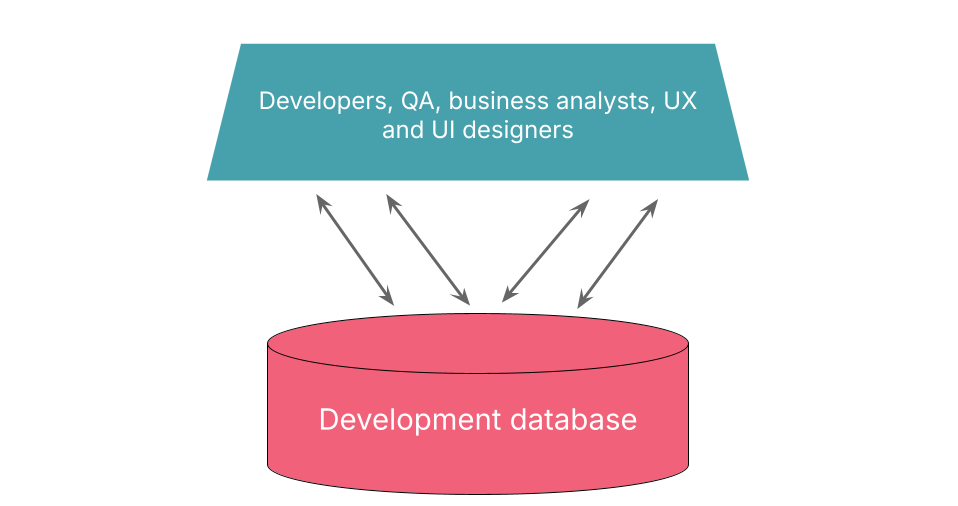
In a shared database, one developer may be testing a business logic change, another debugging a data migration. This can often be helpful, allowing teams to work in parallel, but it can also create new challenges. Here, someone else created test data that Jen doesn’t understand. If Jen applies her schema change to the shared database, she may break someone else’s work; if someone else changes the schema while she is testing, her results may no longer be reliable. If she adds test data, it may interfere with another developer’s assumptions.
Jen can wait until the shared database is free, which protects the team from collisions, but it then turns a small feature into a scheduling problem and hurts productivity. While she can coordinate with other developers — “Are you using dev right now?” “Can I run a migration?” “Please don’t reset the data for the next hour” — it doesn’t scale, especially with a remote or multi timezone team.
Jen thinks of another option: using a local in-memory database. However, she knows this setup doesn’t match the state of the database used by the rest of the team, which means she won’t have sufficient confidence in her solution; the change may work locally yet still fail later when it meets the real data and schema in higher environments like staging and production.
The real problem Jen is encountering is of slower feedback. She can make the change, but without rapid feedback the database change becomes something the team treats carefully; they end up picking the first solution that works and never experimenting, and trying multiple solutions. This leads to suboptimal solutions, reduced productivity and dissatisfied developers.
Using Lakebase, Jen has the ability to branch a database for her individual use. This capability completely changes the way she works.
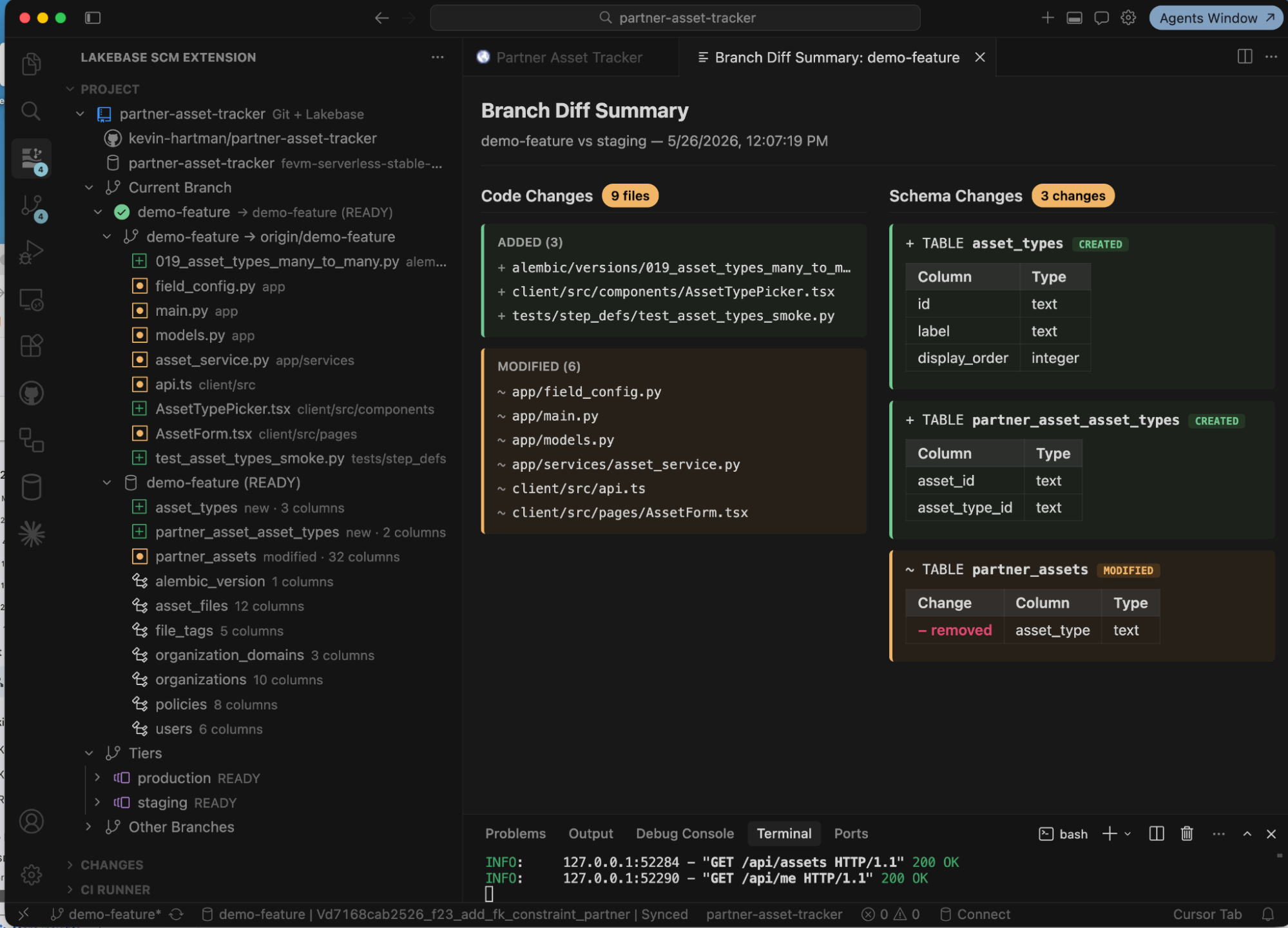
Instead of waiting for the shared development database to become available, Jen creates a database branch databricks postgres create-branch for her feature or using a VS Code / Cursor Extension. This changes the shape of the work immediately. She is no longer asking the team for a quiet window. She’s no longer negotiating with other developers about who can run which migration and when and no longer trying to protect her half-finished change from everyone else’s half-finished changes. She has her own isolated database space, created from the same kind of database environment the application will eventually use in production.
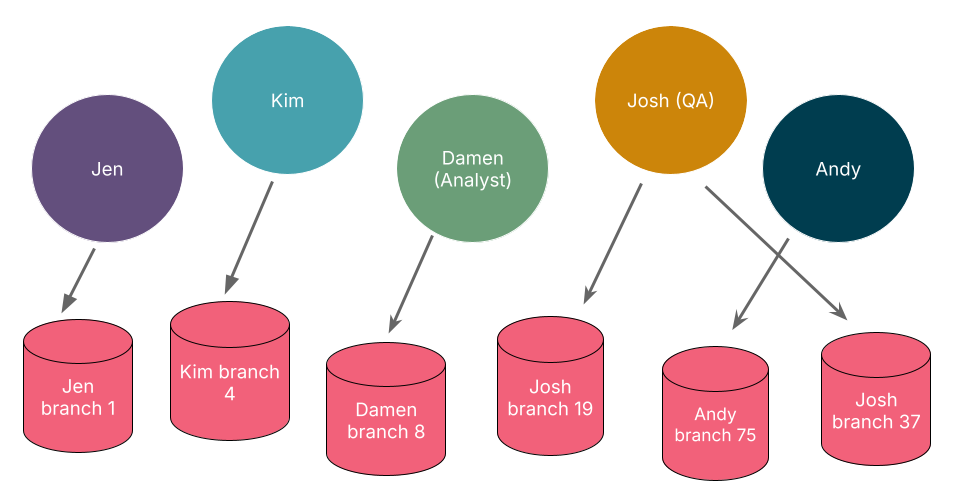
The branch gives Jen a fast copy of the database state she needs to work against. She now has the same Postgres engine, the same schema, the same governance policies and the same production-shaped data she'd see if she queried production directly. The only difference: this branch can be modified, discarded or recreated without affecting any other workload. She’s not testing against a simplified local database that behaves differently from production; she’s working with the same database type the team uses in production, with the same kinds of schema rules, constraints, indexes, reference data and migration history that make database changes succeed or fail in the real world.
That realism matters because many database problems don’t appear in isolated unit tests. They appear when a new migration meets existing structure, existing data, existing assumptions and existing application behavior.
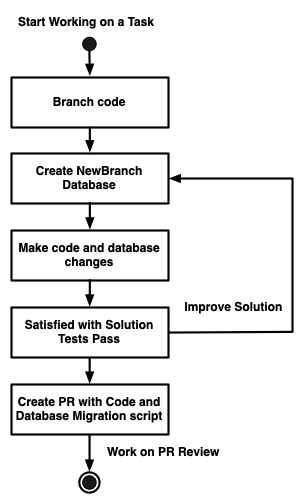
Now Jen can treat the database change as part of design, not just as a deployment step. She can try the obvious version first: add the new columns, set a default logic to split the existing column, create a database migration script, update the application and run the tests. Then she can ask better questions:
In the branched workflow, Jen can explore them while the feature is still being shaped. The DBA can pair with her to guide her on production nuances and data volumes, thus providing valuable input in the design of the solution instead of being an after-the-fact reviewer.
Jen writes the migration script. Whatever her team uses — Flyway, Liquibase, Alembic, Knex, Prisma — the script lives in the code repo, alongside the application changes. Schema and data migration travels with code.
-- V87__split_inventory_code.sql
ALTER TABLE inventory
  ADD COLUMN location_code VARCHAR(8),
  ADD COLUMN batch_number  VARCHAR(16),
  ADD COLUMN serial_number VARCHAR(32);
UPDATE inventory
SET location_code = SUBSTRING(inventory_code, 1, 8),
batch_number = SUBSTRING(inventory_code, 9, 16),
serial_number = SUBSTRING(inventory_code, 25);ALTER TABLE inventory DROP COLUMN inventory_code;(This is the Split Column refactoring – one of ~70 patterns catalogued in Refactoring Databases, the book that operationalized the seven practices.)
She applies the migration to her branch using flyway migrate. The tool runs in under a second against real-shaped data. She updates her repository code to read and write the three new columns. She runs her test suite. Tests pass against real Postgres: no mocks, no in-memory substitutes.
If she wants a clean slate to try a different approach, she discards the branch and creates a fresh one off production. Another second. No cleanup tickets and no DBA involved.
Same Jen, same refactoring: what changed is the capability.
The ability to experiment is important. Evolutionary design and development isn’t just about moving quickly through a predefined checklist. It’s also about learning as the work becomes more concrete. Jen may discover the first schema design works but creates awkward application logic. She may discover that the second design is cleaner but makes migrating existing records more complicated. She may discover that a small normalization decision now would make future changes easier. The first migration script she wrote the SUBSTRING indexes are off by one. The destructive DROP COLUMN ran before she could verify the new columns have been populated correctly. However, because she has her own branch, these discoveries are inexpensive; she can apply a migration, run the application, inspect the data, roll forward with another migration or reset and try a different path.
The branch also changes the emotional posture of the work. Jen doesn’t have to be overly cautious because someone else might be depending on the shared development database. She doesn’t have to announce every experiment to the team. She doesn’t have to clean up test data immediately because another developer might trip over it. Her branch is a safe place for unfinished thinking. It can contain temporary tables, failed migration attempts, awkward test data and half-formed designs without creating noise for anyone else.
At the same time, isolation doesn’t mean detachment from the team’s standards. Jen still writes migration scripts. She still keeps the application code and database change together. She still runs tests. She still expects the final design to be reviewed. The difference is that she can do the messy part of the work privately and quickly before asking the team to reason about the polished version. By the time she opens a pull request, the conversation can focus on whether the design is right, not whether she had a safe place to test it.
This is the key shift: the database branch gives Jen fast, realistic, isolated feedback that she can also get reviewed from her tech leads or DBAs, by showing her database branch. Fast means she can create the environment when she needs it, not when someone provisions it for her. Realistic means she is testing against the same kind of database behavior that matters in production. Isolated means her experiments do not interrupt anyone else. Together, those three properties turn database change from a bottleneck into a normal part of feature development.
Jen can now move the application and database forward together. Her code branch and her database branch become two sides of the same task. One holds the application changes, while the other gives those changes a real database to live against. Instead of waiting, coordinating or pretending with a simplified setup, Jen can design, test, revise and learn. The feature is still small, but now the database is no longer what makes it slow.
Jen commits both the application code and the migration script. She opens a PR.
CI does what Jen just did, but for the team: it creates its own temporary Lakebase branch, applies the migration, runs the application test suite, runs database tests against the migrated schema, validates the migration itself (applies cleanly, idempotent, reversible) and posts a schema-diff comment on the PR showing exactly which database objects changed.
The reviewer can now see what the schema change does inline with the code that uses it, changing their contextual understanding from abstract to concrete.
In the old workflow, the database review question was "will this break the database?" It was gated by a DBA who had to look at every change in isolation because every change had production-scale consequences if it got loose. Reviews were synchronous and schedules collided. The DBA's calendar became a queue and sometimes the DBA would even be skipped for time to market reasons.
In the new workflow, the question is "is this the right design?" The DBA has already seen the schema diff posted by CI. They've already seen the migration run successfully against a real-data branch. Jen can also pull in the DBA for a discussion, to show what she is thinking and all the other options she’s tried. The DBA can review on their schedule, not Jen's. They can provide review much earlier in the cycle and improve the solution around data integrity, indexing strategy, future extensibility or long-term maintainability, not on the protective gatekeeping that used to take all their time.
The team reviews code and database together. One PR, one conversation, same window.
The migration has already been tested against a real data branch. The application has already run against the changed schema. The schema migration has been reviewed. The CI build has run the same exact steps and has been green for an hour.
When Jen merges, the migration applies to the next environment, the branches for database and code for CI environment and Jen are cleaned up. This ensures the database change is no longer a release-night surprise.
What Jen just did is the fifth practice from the 2003 essay: continuous integration of database changes.
Database change becomes part of normal development. Branching reduces waiting, risk and coordination overhead. Jen's daily loop now gives her fast, isolated feedback at the database layer.
In part two, we'll explain what lifted and why the compensating layer Jen worked around her whole career can come out: copy-on-write branching, the architecture that makes it work and the methodology optimizations that follow.
In part three we'll look at what Jen's story looks like when she's one of fifty developers, or maybe she is working on a white labeled product, or she is working on a modular monolith with lots of domains inside it – governance at branch creation, the DBA reframe, the agent-in-the-loop and the platform-design work that opens up when the DBA's calendar isn't a ticket queue.
For readers who want the tour of the IDE tooling Jen used in this post, there's the Companion: Plugin Walkthrough – the Lakebase SCM Extension for VS Code / Cursor, end to end. Finally, a Lakebase App Dev Kit for agents to use accompanied by an ebook for humans to follow will be released shortly.
A version of this post was first published on databricks.com.